

[UPDATED 2025] Veeam VMCE_v12 Questions Prepare with Free Demo of PDF
NEW 2025 Certification Sample Questions VMCE_v12 Dumps & Practice Exam
NEW QUESTION # 97
A customer wants to start an on-demand lab from backup files for several mission critical VMs.
What SureBackup feature should be configured to identify the necessary VMs?
- A. Application Group
- B. Staged Restore
- C. Virtual Lab
- D. Secure Restore
Answer: A
Explanation:
When starting an on-demand lab from backup files for mission-critical VMs, the appropriate SureBackup feature to configure is A: Application Group. An Application Group in Veeam Backup
& Replication is a predefined group of VMs that are started together in the SureBackup job. This feature is designed to ensure that interdependent VMs, such as those comprising a multi-tier application, are started in a sequence that respects their operational dependencies, allowing for comprehensive verification and testing. The Application Group can include the mission-critical VMs and any associated VMs required for the application environment to function correctly, ensuring that all components are available and interact as expected within the isolated on- demand lab environment. This setup facilitates effective testing or troubleshooting in a manner that closely mirrors the production environment without impacting live operations.
NEW QUESTION # 98
A company needs to maintain and verify backups at a secondary site to meet the following requirements: RTO of two hours, RPO of 12 hours, four weeks retention. Which of the following backup copy job configurations meets these requirements?
- A. Periodic backup copy job, scheduled for a 12-hour interval, with 112 restore points to retain
- B. Periodic backup copy job, scheduled for a two-hour interval, with 112 restore points to retain
- C. Periodic backup copy job, scheduled for a 12-hour interval, with 56 restore points to retain
- D. Periodic backup copy job, scheduled for a two-hour interval, with 56 restore points to retain
Answer: C
NEW QUESTION # 99
A planned failover of three VMs has just completed successfully, starting the VMs at the disaster recovery location. What next actions are available for the failover plan?
- A. Undo, Start, Edit, Delete
- B. Cancel, Start, Copy, Delete
- C. Undo, Start, Copy, Delete
- D. Cancel, Start, Edit, Delete
Answer: A
Explanation:
After completing a planned failover for VMs to the disaster recovery site, the typical actions available in Veeam Backup & Replication for a failover plan are:
Undo: This allows you to reverse the failover and return the VMs to the original location.
Start: This would be used to initiate the failover plan if it needs to be executed again.
Edit: This option permits modifications to the failover plan.
Delete: This allows the removal of the failover plan if it is no longer needed.
There are no options for Copy in the context of a failover plan, and the Cancel option is typically available before and during the failover process, not after completion.
NEW QUESTION # 100
Which of the following statements are true regarding backup copy jobs in Veeam Backup & Replication? (Choose two.)
- A. During the backup copy job process, a VM snapshot is created for consistency
- B. Retention settings maintain the desired number of restore points as well as offer optional GFS for archival purposes
- C. The backup copy job creates a single file with multiple restore points included within for archival purposes
- D. Backup copy jobs copy entire VBK, VIB, or VRB files from the source backup repository to the target backup repository
- E. The backup copy job creates a forever forward incremental backup chain
Answer: B,E
Explanation:
https://helpcenter.veeam.com/docs/backup/vsphere/about_backup_copy.html?ver=100
NEW QUESTION # 101
Veeam ONE's ____________________ provides a single pane of glass view for all Veeam backup servers, proxies, and repositories in a backup infrastructure.
- A. Infrastructure View
- B. Data Protection View
- C. System View
- D. Business View
Answer: B
Explanation:
Explanation
https://helpcenter.veeam.com/docs/one/qsg/data_protection.html?ver=120
Veeam ONE's Data Protection View provides a single pane of glass view for all Veeam backup servers, proxies, and repositories in a backup infrastructure. This view allows you to monitor the overall state of the backup infrastructure, check the summary dashboards, view triggered alarms, check the latest job status, work with performance charts, and view the list of events1. The Data Protection View also includes information about Veeam Backup for Microsoft 365 jobs and protected data2. References:
Data Protection Monitoring - Veeam ONE Quick Start Guide
Veeam Backup for Microsoft 365 Data Protection - Veeam ONE Monitoring Guide Veeam Backup for Microsoft 365 Data Protection - Veeam ONE Monitoring Guide
Databases - Veeam ONE Monitoring Guide
NEW QUESTION # 102
An engineer needs to test the impact of operating system updates on app functionality in an isolated non-production environment.
What Veeam Backup and Replication feature can be used to facilitate this?
- A. Replication
- B. Instant Recovery
- C. Direct Storage Snapshots
- D. Virtual Labs
Answer: D
Explanation:
Virtual Labs is the ideal feature for testing the impact of operating system updates in an isolated environment.
Virtual Labs allow you to create a secure, isolated copy of your production environment where you can test updates, patches, and other changes without affecting the live environment.References:Veeam Backup & Replication Documentation, Veeam Virtual Lab Guide
NEW QUESTION # 103
Which procedure is used to finalize replica failback?
- A. Quick Migration
- B. Migrate to production
- C. Replica failback does not need to be finalized
- D. VMware Storage vMotion
- E. Commit failback
Answer: E
NEW QUESTION # 104
A customer wants to set up a Scale-Out Backup Repository. Due to malware concerns, immutability is recommended. An on-premises server can be used to hold primary backups, but it can only hold about 21 days of backups. A copy of the backups should be stored in AWS. The retention for all backups is 60 days.
Which configuration of a Scale-out Backup repository meets these requirements?
- A. Copy and move mode
Performance Tier: Windows REFS, immutability set for 11 days
Capacity Tier: Amazon S3, immutability set for 60 days - B. Copy mode
Performance Tier: Windows REFS, immutability set for 11 days
Capacity Tier: Amazon S3, immutability set for 60 days - C. Copy mode
Performance Tier: Linux Hardened Repository, XFS, immutability set for 11 days Capacity Tier: Amazon S3, immutability set for 60 days - D. Copy and move mode Performance Tier: Linux Hardened Repository, XFS, immutability set for 11 days Capacity Tier: Amazon S3, immutability set for 60 days
Answer: D
Explanation:
To meet the requirements of setting up a Scale-Out Backup Repository (SOBR) with immutability for malware protection and specific retention policies, the most fitting configuration is D: Copy and move mode with a Performance Tier configured on a Linux Hardened Repository using the XFS file system and immutability set for 21 days, and a Capacity Tier on Amazon S3 with immutability set for 60 days. This setup utilizes the copy and move mode to ensure that backups are first stored on the on-premises Linux Hardened Repository with an immutability setting that prevents modifications to backups, providing protection against malware for the most recent 21 days of backups. As this on- premises server has limited capacity, older backups beyond 21 days are moved to the Capacity Tier in Amazon S3, where they are also protected with immutability for the entire 60-day retention period. This configuration leverages the strengths of both on-premises and cloud storage while ensuring that all backups are protected from modification or deletion by immutability, aligning with the customer's malware protection concerns and retention requirements.
NEW QUESTION # 105
Which of the following is a backup mode that can be configured within a Veeam Agent for Windows backup job?
- A. Forward incremental with optional periodic synthetic and/or active full backups
- B. Reverse incremental with optional periodic synthetic full backups
- C. Forward incremental and reverse incremental, both with optional periodic synthetic and/or active full backups
- D. Reverse incremental with periodic active full backups
Answer: B
Explanation:
https://helpcenter.veeam.com/docs/backup/hyperv/forward_incremental_backup.html?ver=
NEW QUESTION # 106
Which Veeam feature allows for an administrator to help ensure general data protection regulation (GDPR) compliance?
- A. Secure restore
- B. Location tagging
- C. Immutability
- D. Veeam Business View
Answer: A
Explanation:
Explanation
The Veeam feature that allows for an administrator to help ensure general data protection regulation (GDPR) compliance is Secure Restore. Secure Restore is an option that enables Veeam Backup & Replication to scan machine data with antivirus software before restoring the machine to the production environment. This way, the administrator can prevent malware infection or data leakage from the restored machine, which may violate the GDPR requirements. Secure Restore is available for various restore operations, such as Instant Recovery, Entire VM Restore, Virtual Disks Restore, and more1. For more information on Secure Restore, see How to improve security with Veeam DataLabs Secure Restore.
NEW QUESTION # 107
For general data protection regulation (GDPR) compliance, Veeam can add a location tag to which component?
- A. Cloud gateways
- B. WAN accelerators
- C. Guest interaction proxies
- D. vCenter servers
Answer: D
Explanation:
Veeam Backup & Replication offers the capability to assign location tags to different components within the backup infrastructure, including vCenter servers. This feature is particularly useful for GDPR compliance, as it allows administrators to specify the physical location of the data processed and stored within vCenter servers, helping to ensure that data sovereignty and regulatory requirements are met.References:
* Veeam Backup & Replication User Guide: Location Tagging for GDPR Compliance
* Veeam Help Center: GDPR Compliance and Data Location Controls
NEW QUESTION # 108
Which backup method produces a backup chain that consists of the first full backup file (VBK) and a set of incremental backup files (VIB) following it? Additionally, the backup chain contains synthetic full and/or active full backup files that divide the backup chain into shorter series.
- A. Forward incremental backup
- B. Reverse incremental backup
- C. Forever forward incremental backup
- D. Differential incremental backup
Answer: A
Explanation:
Reference:https://helpcenter.veeam.com/docs/backup/vsphere/forward_incremental_backup.html?ver=100
NEW QUESTION # 109
A backup administrator must enable guest file system indexing for a backup job of a Microsoft Windows file server VM. All required credentials are added to the Veeam Backup & Replication server. VMware Tools (VIX) cannot be used due to security regulations. What should be done to make it possible in the following environment?
- A. Connect the ESXi host to the VM network
- B. Use the Veeam Backup & Replication server as a quest interaction proxy
- C. Install a file system indexing plugin on the Microsoft Windows file server
- D. Use the proxy server as a guest interaction proxy
Answer: D
Explanation:
If VMware Tools (VIX) cannot be used due to security regulations, the backup administrator can use the proxy server as a guest interaction proxy to enable guest file system indexing for a backup job. The guest interaction proxy is responsible for the deployment and coordination of guest processing tasks, such as guest file system indexing, which does not require VIX.References:
* Veeam Backup & Replication User Guide: Guest Interaction Proxy
* Veeam Knowledge Base: Configuring Guest Interaction Proxies
NEW QUESTION # 110
Which API is available to automate Veeam Backup and Replication operations?
- A. REST API through Veeam One server
- B. REST API through Veeam Backup and Replication Server
- C. Powershell cmdlets through Veeam Enterprise Manager Server
- D. SQL queries on the Veeam Backup and Replication database
Answer: B
Explanation:
The REST API through Veeam Backup and Replication Server is the available API for automating Veeam Backup and Replication operations. This API enables programmatic control over Veeam Backup & Replication and allows for integration with external systems and custom automation scripts.
NEW QUESTION # 111
When planning to back up files and folders from shared sources, that is the correct method to connect to the file share from the Veeam backup server?
- A. Add the file share into the managed servers
- B. Add the file share into the store infrastructure
- C. Add the file share into the inventory
- D. Add the file share into the physical infrastructure
Answer: C
NEW QUESTION # 112
What happens if there are more than five unsuccessful attempts to enter the confirmation code during MFA login?
- A. The user is locked out for 1 minute.
- B. The user is locked out for 1 hour.
- C. The user is locked out for 24 hours.
- D. The user is permanently locked out.
Answer: A
Explanation:
If there are more than 5 unsuccessful attempts, the user can reopen the console and try to log in again after waiting for at least one minute. If the problem persists, the backup administrator can reset MFA by request.
https://helpcenter.veeam.com/docs/backup/vsphere/mfa.html?ver=120
NEW QUESTION # 113
Sometimes snapshots are "lost" by vCenter. What tool finds and removes those lost snapshots?
- A. Snapshot Extractor
- B. Snapshot Hunter
- C. Veeam ONE Orphaned VM Reporter
- D. CLI Snapshot Removal Tool
Answer: B
NEW QUESTION # 114
A backup job is configured as follows.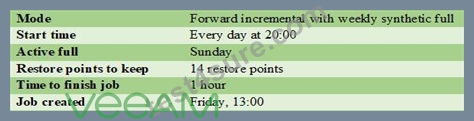
How many full and incremental restore points will be in a repository on day 16 at 23:00?
- A. 1 full and 13 incremental
- B. 2 full and 12 incremental
- C. 3 full and 14 incremental
- D. 3 full and 15 incremental
Answer: B
NEW QUESTION # 115
A failover plan helps you perform automatic failover for dependent VMs one by one, as a group. What can you define in a failover plan?
- A. Set the RTO value per VM according to the organization policy.
- B. Define an alert for when the failover plan should be executed.
- C. Target the destination host that the failover would be performed to.
- D. Define the order in which VMs must be processed and the interval time between two VMs to failover.
Answer: D
NEW QUESTION # 116
......
VMCE_v12 Deluxe Study Guide with Online Test Engine: https://freecert.test4sure.com/VMCE_v12-exam-materials.html